
Property statements due May 7 2026 11:59PM without penalty but may E-file through Jun 1 2026 11:59PM with a late penalty.
Welcome to the E-Filing process for Property Statements. At any time prior to submitting the Statement for E-Filing, you may print/save a draft copy for your review. When you have completed the E-Filing process you should print/save a final copy of your Property Statement for your own records.
This version is optimized for screen readers, keyboard navigation, and other
accessibility needs.
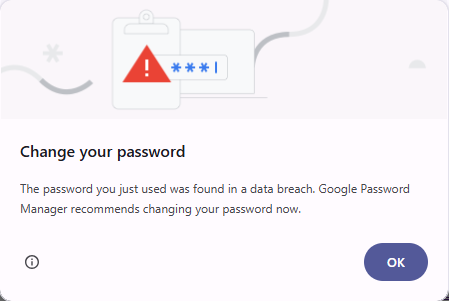
When logging in for E-Filing using Google Chrome, some users may experience
a browser prompt requesting a change of password. This is caused by Google's Password Checkup feature, which you can read more about here
If the Password change prompt appears, please click OK to close the prompt and proceed as normal with your filing.
We confirm that all credential information has been verified and is secure.
To print the Property Statement that you have e-Filed, you will need Adobe Acrobat Reader. It is recommended that you complete the Adobe Reader installation before you begin to E-File your Property Statement.

Secure Sockets Layer (SSL/TLS) is used to ensure security. This may affect response time. We recommend a broadband internet connection.
If you are E-Filing for the first time you must complete all required information.
If you E-Filed last year, you will be shown what you E-Filed or what the Assessor has on file. You must review all of this information for accuracy and make necessary corrections for your current year E-Filing.